
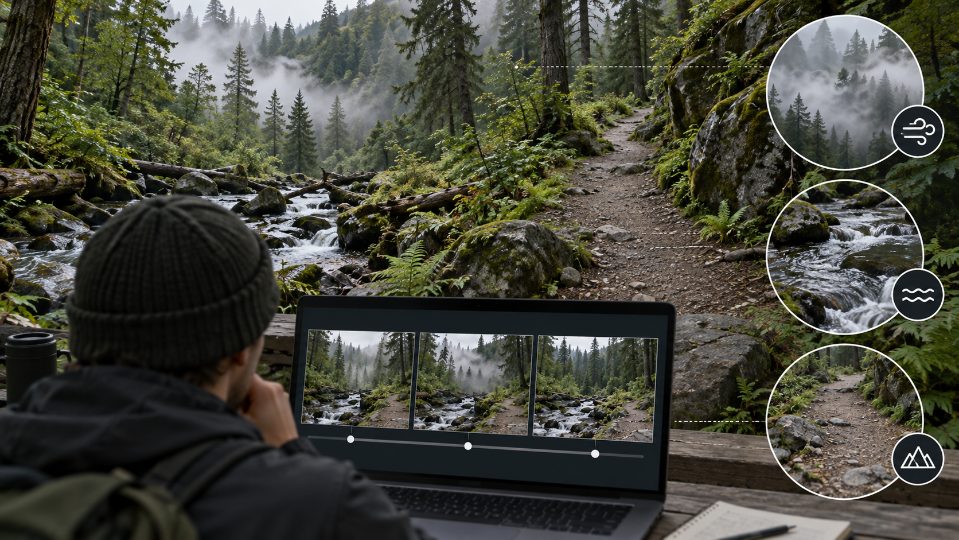
A still trail photo invites motion. Fog could drift through the trees, water could move over stones, and grass could bend in a light breeze. The same image also invites invention. A clear afternoon becomes a storm, a quiet path gains a bear, or a gentle creek turns into a dangerous crossing. Those changes may look cinematic, but they can quietly change what the original photo records.
An AI video tool can animate an image, yet the useful brief starts with an evidence boundary. AIVideoEditor.me presents image-led video routes alongside models such as Veo, Kling, Wan, and Seedance. The model choice comes after the editor decides which movement is atmospheric, which claim belongs in a caption, and which detail must not be invented.
Table of Contents
Separate Recorded Conditions From Decorative Motion
List what the photo proves: visible cloud cover, trail surface, water level, snow, people, and animals actually present in frame. Then list motion that could be added without changing those facts. A small ripple can extend visible water. A sudden downpour creates a new weather claim. A bird crossing a blank sky creates wildlife that was never recorded.
Write An Evidence Boundary Before A Prompt
For an AI video editor brief, use three labels: fixed evidence, allowed motion, and prohibited invention. This takes less than a minute and gives the generated clip a clear review contract. The boundary is especially important when the loop will sit beside a route note, safety post, or travel recommendation where viewers may treat the visual as recent documentation.
|
Scene element |
Allowed motion |
Reject when |
|
Visible fog |
Slow lateral drift |
Visibility falls beyond the photo |
|
Creek surface |
Small ripples |
Water level rises |
|
Empty trail |
Moving leaf shadows |
People or animals appear |
The table stays conservative because the source is a record, not a blank scene. A mood loop does not need to recreate everything that could plausibly happen in the woods.
Keep the original photo beside the table, not only inside the generation interface. Reviewers need an unaltered source that cannot be confused with a later frame export. Record its capture date and location only when those facts are known. A filename or social caption is not enough evidence for a precise claim about conditions.
Run Three Tests Against The Evidence Boundary
Test the same source with three increasingly difficult instructions. The first checks whether quiet motion can preserve geometry. The second adds a weather cue already visible in the frame. The third asks the reviewer to detect prohibited wildlife or route changes. The goal is to expose drift before the clip reaches a public page.
Start With The Clean Motion Control
Ask for one small action such as water moving while the camera remains locked. Protect rock positions, trail width, vegetation, and light. This control shows whether the route can animate without redesigning the location. If it fails, adding fog or camera movement will make diagnosis harder.
Export the first, middle, and last frames from this control. Place them under the source and circle any changed landmark. The comparison should include the edge of the frame, where new branches, signs, or figures are easy to miss during playback. A clean control becomes the baseline for every more ambitious version.
Add Only Weather That Is Already Visible
If the image contains mist, ask for slow mist movement without changing visibility. If branches show wind, allow a slight sway. Do not infer rain from wet ground or snow from cold color. When you edit videos online, describe the visible cue and its limit in the prompt, rather than inventing a dramatic story about the place.
Use relative language tied to the source, such as “keep the far ridge equally visible,” instead of inventing a wind speed or rainfall rate. Numbers imply measurement that the photo cannot provide. If a factual value matters, place it in adjacent copy sourced from a weather station or land manager and label its time period clearly.
Inspect For Wildlife And Route Invention
Watch the margins, distant trees, and final frames. Small figures and animals can appear where the source was empty. Trail signs may gain unreadable symbols, and rocks may move enough to imply a different crossing. Freeze the first suspicious frame and compare it with the original rather than trusting the loop at normal speed.
Use two reviewers when the loop supports practical advice. One checks the scene against the photograph; the other reads the surrounding text for claims the motion appears to confirm. A harmless decorative change can become misleading when it sits beside a sentence about current access, wildlife, or water. The combined review catches that contextual problem.
Keep Safety Facts Outside Generated Frames
Trail status, closure dates, distances, water depth, and wildlife warnings should stay in editable copy from an authoritative source. Generated motion from AIVideoEditor.me can set atmosphere but cannot verify current conditions. AIVideoEditor.me outputs should therefore stay separate from dated field reports and official trail notices, even when the animation looks entirely plausible.
Label Illustration When Context Could Mislead
If the clip contains generated movement, describe it as an illustrative animation rather than recent footage. Keep the capture date of the source photo nearby when it matters. This small disclosure protects viewers from reading a mood piece as evidence of today's weather or route condition.
Place that label where a viewer encounters the clip, not in a distant production note. Short wording is enough when it is visible. The goal is not to undermine the image; it is to distinguish an atmospheric extension from documentary footage and give readers the correct frame for judging it.
Use A Still When Movement Adds A Claim
Some photographs should remain still. A rare animal sighting, unstable crossing, emergency scene, or culturally sensitive place may lose accuracy when animated. Leaving that photograph still is an editorial decision, not a missed production opportunity.
Archive the approved still, prompt, generated output, and evidence table together. If the surrounding trail information changes, the team can identify which element needs revision without guessing how the loop was made. That record also prevents a later editor from presenting the generated motion as an original capture.
Before publication, ask one person who did not make the loop to list every factual claim they think it communicates. Compare that list with the evidence table and surrounding copy. Unexpected claims reveal where motion, captions, and context combine to suggest more than the source can support. Revise the presentation, not the viewer's reasonable interpretation.
Publish Atmosphere Without Rewriting The Trail
AIVideoEditor.me can help outdoor writers create restrained loops from scenery they already own. It is a poor fit for reconstructing events that were not filmed or illustrating safety facts that require current verification.
Fix the evidence boundary first, add one quiet motion, and compare every frame with the source. The best loop lets a reader feel the stillness of the place while leaving weather, wildlife, and route facts exactly where the photograph left them.