
Instagram Reels have become a useful source of travel inspiration. From hidden beaches and local restaurants to walking routes and hotel recommendations, short videos can help travelers discover places worth visiting.
However, finding a helpful Reel does not guarantee you can watch it later. Limited internet access, expensive roaming data, and unreliable connections can make revisiting travel videos difficult.
Downloading Instagram Reels for offline reference can help you organize ideas before departure. Whether you are planning a weekend getaway or an international trip, understanding the available download methods makes preparation easier.
This guide explains how to save Instagram Reels, organize travel references, and understand important privacy, quality, and copyright considerations.
Table of Contents
- Why Download Instagram Reels for Travel Planning?
- How Downloading Instagram Reels Works
- Save Travel Reels With Grabfy
- How to Download Instagram Reels Using Instagram
- Downloading Instagram Reels on Different Devices
- Use Grabfy for Offline Travel Video Collections
- Organizing Downloaded Reels for Travel
- Why Some Instagram Reels Cannot Be Downloaded
- How to Preserve Video Quality
- Safety, Privacy, and Copyright Considerations
- Frequently Asked Questions
- Final Thoughts
Why Download Instagram Reels for Travel Planning?
Travel Reels often contain practical information that is easier to understand visually.
A short video might demonstrate how to reach a viewpoint, navigate a train station, or identify a restaurant entrance.
Saving useful clips allows you to review these details without depending on an internet connection.
Downloaded Reels can also help you:
- Remember destinations and attractions.
- Review transportation tips before departure.
- Compare hotels, restaurants, and activities.
- Collect packing and itinerary inspiration.
- Organize visual references for different destinations.
However, travel information can change. Always verify opening hours, transportation schedules, prices, and local regulations through reliable sources.
How Downloading Instagram Reels Works
Instagram Reels are normally streamed through the platform rather than permanently stored on your device.
Downloading creates a separate video file that may be available for offline viewing.
There are three common methods.
Instagram’s built-in download feature: Saves eligible public Reels when the creator allows downloading.
Browser-based downloader: Uses a publicly accessible Reel link to retrieve available video content.
Screen recording: Captures video playback but may include interface elements and reduced quality.
For travel planning, a browser-based downloader can be convenient when you want to organize publicly accessible clips across different devices.
Save Travel Reels With Grabfy
When collecting destination recommendations, Grabfy offers a practical starting point for downloading publicly accessible Instagram content.
Its browser-based tools allow travelers to save supported videos without installing a separate downloading application.
This makes Grabfy useful for building an offline collection of travel inspiration, including sightseeing ideas, restaurant recommendations, and itinerary references.
Instead of relying entirely on saved posts inside Instagram, you can keep available video files in organized folders on your device.
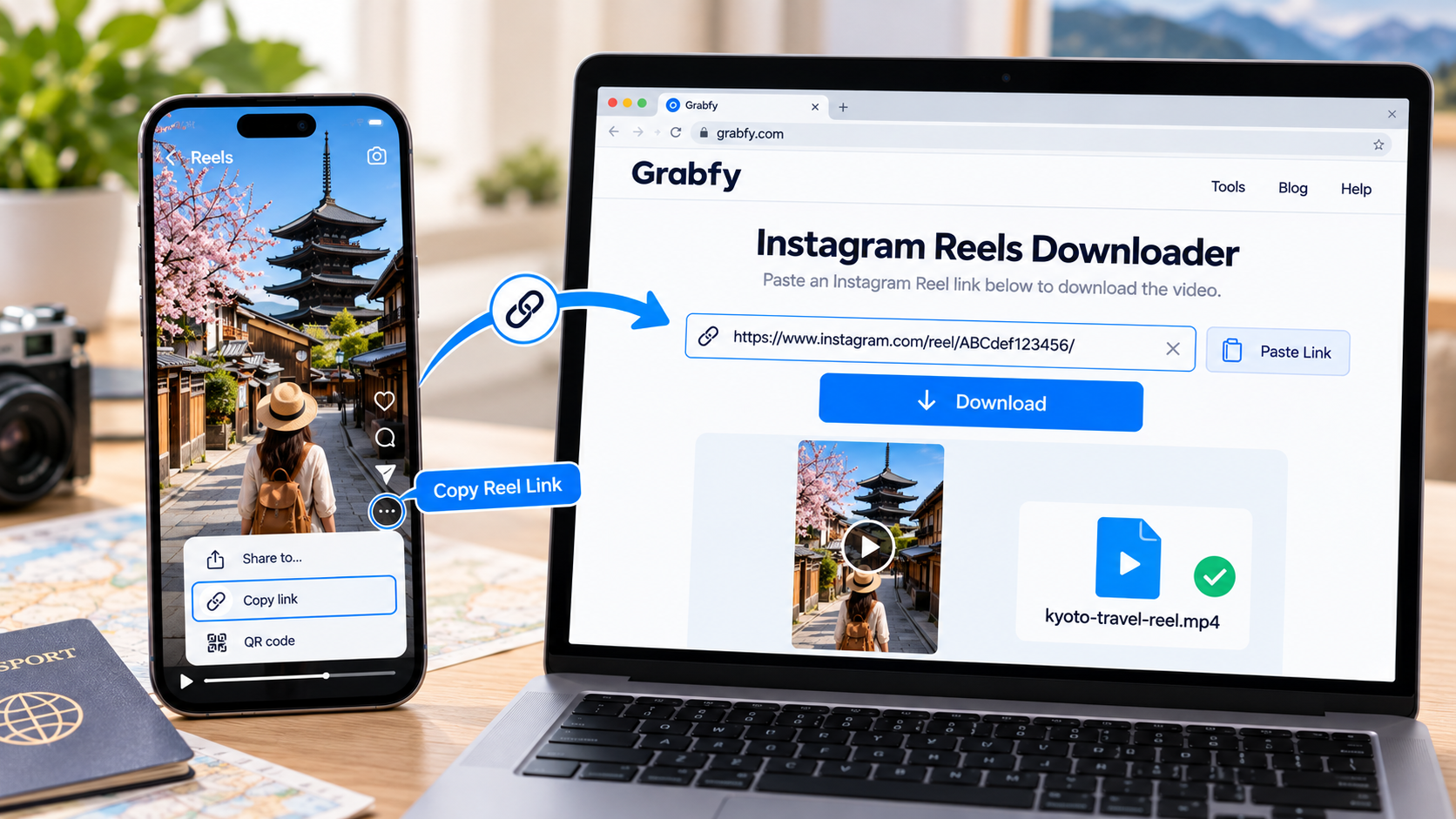
Step 1: Copy the Instagram Reel Link
Open Instagram and locate the public Reel you want to save.
Open the Reel, tap the share menu, and choose Copy link. You can also tap the three dots on the Reel you want to save and tap Copy Link.
On desktop, open the Reel in your browser and copy its URL from the address bar to use in the next step.
Make sure the link points to the individual Reel rather than the creator’s profile.
Step 2: Paste the Link Into the Downloader
Open Grabfy’s Reel downloading tool in a compatible browser in a new tab.
Paste the copied URL into the input field and follow the available download instructions to save the Instagram Reel video.
You should not need to provide your Instagram password to submit a public Reel link.
Step 3: Save the Video
Once the Reel video becomes available, select the download option.
The file will typically save as an .mp4 file in your browser’s designated Downloads folder on desktop or on your phone, depending on the device.
Move it into your travel planning folder for easier access later.
How to Download Instagram Reels Using Instagram
Instagram lets users download eligible Reels from public accounts when creators enable downloading.
Follow these steps:
- Open Instagram and locate the Reel.
- Tap the share icon.
- Look for Download.
- Select the option and wait for the file to save.
- Open your phone’s camera roll, Photos app, or photo gallery.
If you download an Instagram reel that you posted yourself through Instagram, it can be saved without a watermark.
Downloaded videos may include an Instagram watermark and the creator’s username.
If the Download button is unavailable, the creator may have disabled downloads, or the content may not qualify for the feature.
Private Reels are not accessible through ordinary public-link downloaders.
Downloading Instagram Reels on Different Devices
Download Instagram Reels on iPhone
Eligible Reels can be downloaded through Instagram directly to your Photos app.
For browser downloads, open Safari, paste the public Reel link into the downloader, and save the available file.
If the video appears in Files, open it and select Share > Save Video when available.
Download Instagram Reels on Android
Android users can download eligible Reels through Instagram or a compatible browser.
Files generally appear in Downloads and may also become visible in Gallery or Google Photos.
Download Instagram Reels on Desktop
Windows and Mac users can copy a public Reel URL, open a compatible downloader, and save the video.
Desktop downloading is useful when organizing larger collections of travel references.
Use Grabfy for Offline Travel Video Collections
A convenient Instagram Reels download workflow can make collecting travel references easier before a trip.
Grabfy provides browser-based access to Instagram downloading features, allowing users to save supported public content and organize the resulting files independently.
For travelers researching several destinations, this approach helps separate useful clips from the many posts encountered while browsing.
Create dedicated folders for each city, attraction, or itinerary day so important references remain easy to locate.
Organizing Downloaded Reels for Travel
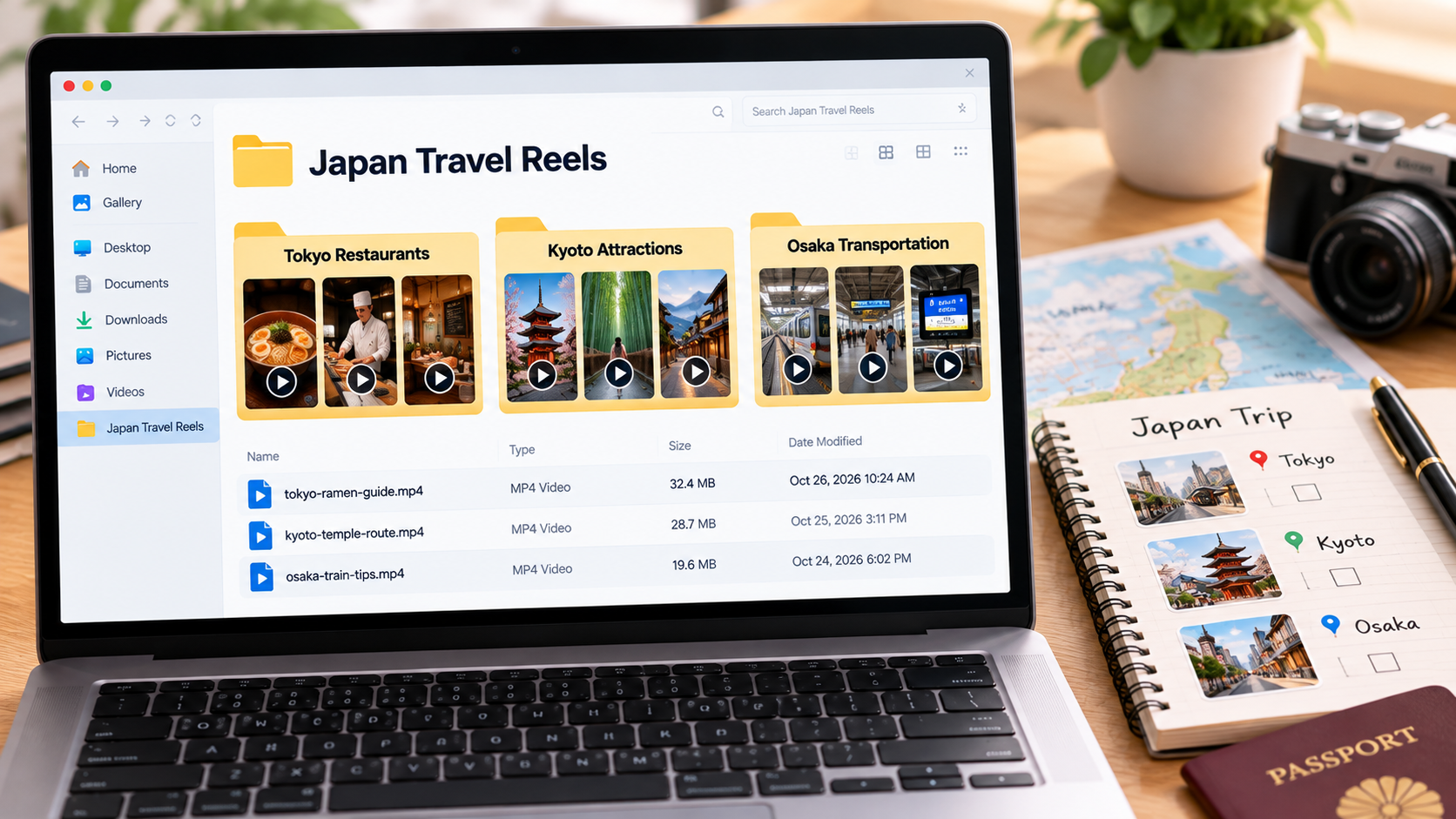
Create Destination Folders
Organize videos by country, city, or neighborhood.
For example, keep separate folders for Tokyo restaurants, Kyoto attractions, and Osaka transportation tips.
Rename Videos Clearly
Replace generic filenames with descriptive names such as kyoto-temple-route.mp4.
Include location names and activities to make searching easier.
Separate Inspiration From Confirmed Plans
Not every appealing travel Reel contains accurate or current information.
Create separate folders for ideas you are considering and activities already confirmed in your itinerary.
Keep Backup Copies
Store important clips in a trusted cloud service or external drive before traveling.
For offline access, confirm that the files are downloaded locally rather than available only through cloud storage.
Why Some Instagram Reels Cannot Be Downloaded
Several factors can affect download availability.
Private Accounts
Public-link downloaders generally cannot retrieve content from private accounts.
Respect account privacy settings.
Creator Download Settings
Public creators can disable Instagram’s built-in download option.
However, this setting does not necessarily determine whether publicly accessible content is available through every external method.
Audio Restrictions
Licensed music may be missing or muted in downloaded videos.
If spoken travel instructions are important, check the saved video’s audio before departure.
How to Preserve Video Quality
Instagram compresses uploaded videos, so downloaded files may not match the original recording quality.
For better results, choose the highest available download quality and avoid repeated screen recordings or exports.
Check the video before traveling, especially when it contains maps, signs, or written directions.
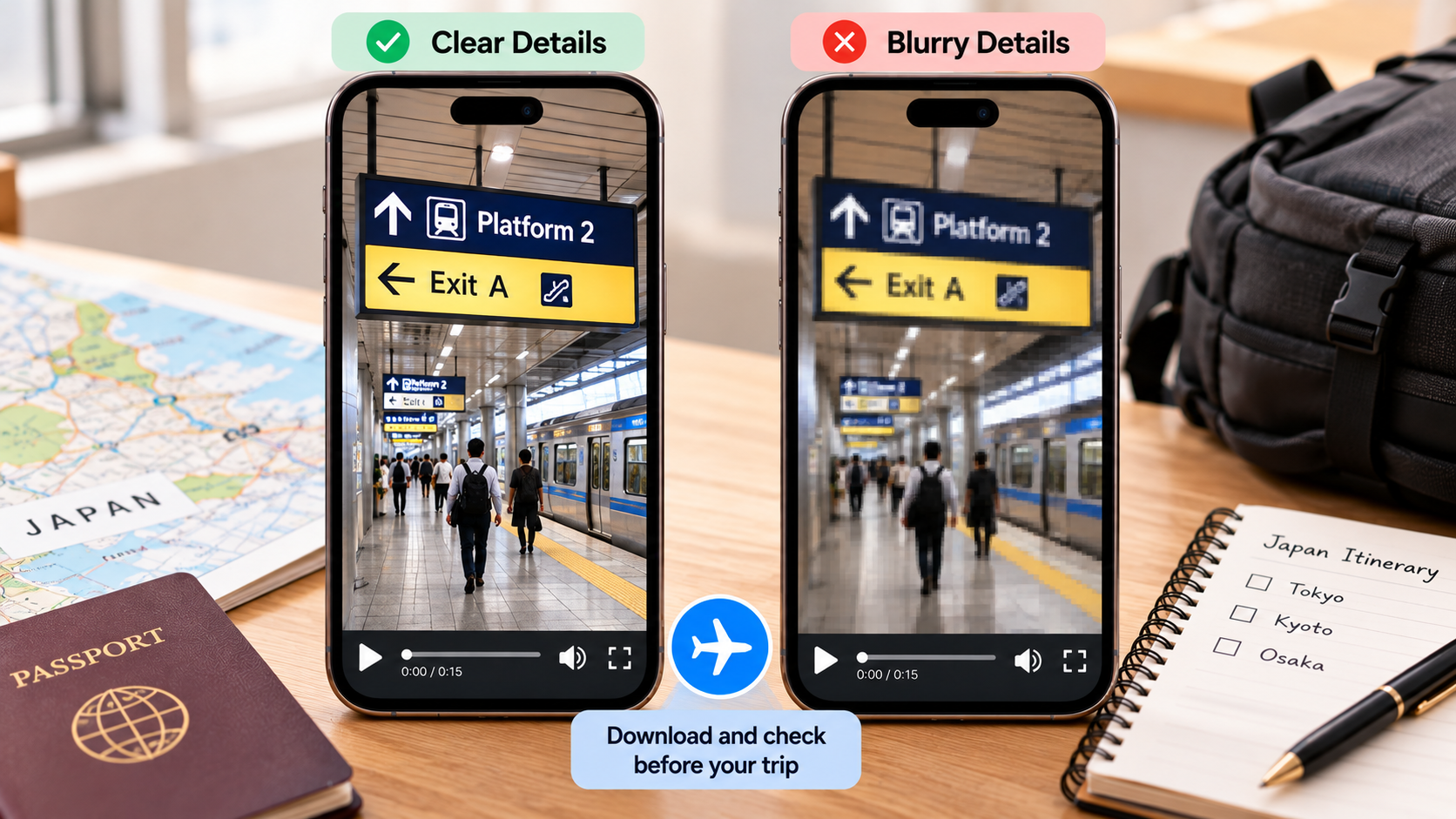
A downloader cannot restore details already lost through compression.
Safety, Privacy, and Copyright Considerations
Downloading a publicly accessible Reel does not transfer ownership or automatically grant permission to republish it.
Use other creators’ travel videos as personal references unless you have authorization for broader use.
Avoid websites requesting Instagram passwords, verification codes, or unnecessary permissions.
Downloading through third-party services also does not guarantee complete anonymity.
For commercial projects, obtain appropriate permission before reusing someone else’s video.
Frequently Asked Questions
Can I Watch Downloaded Instagram Reels Without Internet?
Yes. Once a video file is saved locally, you can generally watch it without an internet connection.
Can I Download Instagram Reels Without an App?
Yes. Browser-based downloaders can save supported public Reels without installing additional software.
Can I Download Reels From Private Accounts?
Public-link downloaders generally cannot access private Reels.
Will Downloaded Reels Include Music?
Sometimes. Licensed music may be removed or muted depending on the download method and applicable restrictions.
Can I Use Downloaded Reels in Travel Videos?
You can reuse your own original content. For another creator’s Reel, obtain permission before republishing or incorporating it into your work.
Final Thoughts
Instagram Reels can make travel planning more visual and engaging, especially when researching unfamiliar destinations.
Downloading useful clips before departure helps you revisit recommendations without depending on mobile data.
Choose an appropriate downloading method, organize files by destination, verify important travel details, and respect creators’ rights.
With a well-organized offline collection, your favorite travel Reels can become practical references throughout your journey.